Kubernetes (K8s) Beginner Guide
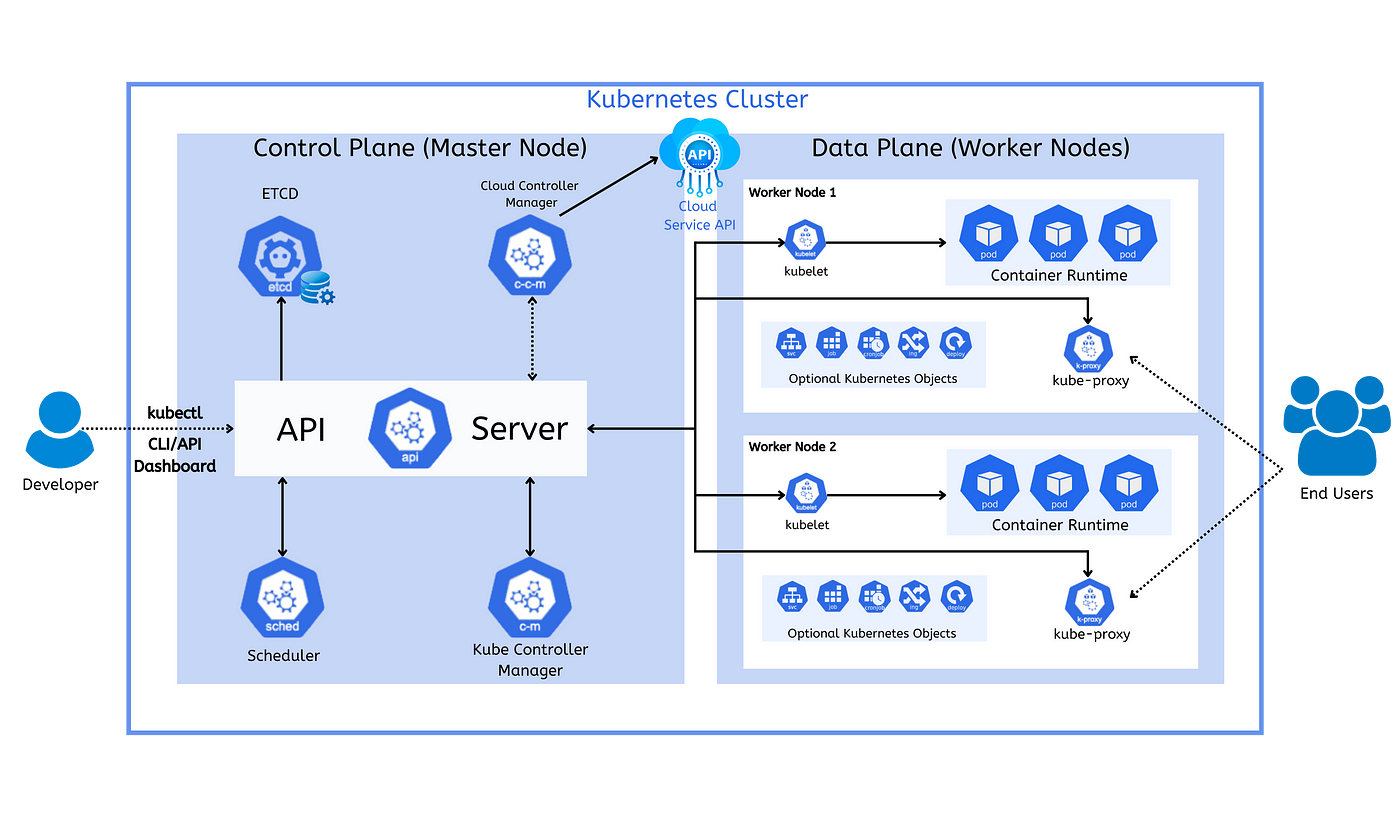
1. What is Kubernetes (K8s)?
Kubernetes is a system that helps you run, manage, and scale applications using containers (like Docker).
- Think of it as a manager of many computers (nodes) that run your app automatically.
Advantages of Kubernetes
A. Automatic Scaling
- Automatically increases or decreases Pods based on traffic
- Handles high load without manual work
Example: More users → more pods created automatically
B. Self-Healing
- Restarts crashed containers
- Replaces failed Pods
- Keeps your app always running
Example: If a pod crashes → Kubernetes creates a new one
C. Load Balancing
- Distributes traffic evenly across Pods
- Prevents overloading of a single server
Result: Better performance and stability
D. Easy Deployment and Updates
- Supports rolling updates (no downtime)
- Can rollback to previous version easily
Example: Update app without shutting it down
E. Service Discovery and Networking
- Provides built-in DNS
- Pods can communicate using Service names
No need to manage IP addresses manually
F. Configuration and Secret Management
- Use ConfigMap for configuration data
- Use Secret for sensitive data
Keeps code clean and secure
G. Efficient Resource Utilization
- Uses CPU and memory efficiently
- Schedules workloads on best available node
Saves cost, especially in cloud environments
H. Cloud Agnostic
- Works on AWS
- Works on Azure
- Works on Google Cloud
- Works on on-premise systems
No vendor lock-in
I. High Availability
- Runs multiple replicas of applications
- If one fails, others continue running
Ensures system uptime
J. Microservices Friendly
- Ideal for modern applications
- Manages multiple services easily (frontend, backend, APIs)
K. Declarative Configuration
- Define desired state using YAML files
- Kubernetes ensures the state is maintained
Example: "I want 3 pods" → always keeps 3 running
L. Automation
- Automates deployment
- Automates scaling
- Automates recovery
Reduces manual DevOps effort
2. Overall Structure
Kubernetes is divided into 2 main parts:
i. Control Plane (Master Node)
- Brain of the system (makes decisions)
ii. Data Plane (Worker Nodes)
- Actual workers (run your applications)
3. Control Plane (Master Node)
This part controls everything.
Components:
1. API Server
- Entry point of Kubernetes
- All commands go through here (
kubectl, UI, etc.) - Talks to all components
Example:
kubectl create pod
- It goes to API Server first
2. ETCD
- Database of Kubernetes
- Stores cluster data (pods, nodes, configs)
- Key-value storage
- Everything about the cluster is saved here
3. Scheduler
- Decides which worker node will run your pod
- Checks CPU, Memory, Availability
Example: If Node 1 is free → place pod there
4. Controller Manager
- Keeps system in desired state
- Fixes problems automatically
Example:
- If pod crashes → it creates a new one
- If you want 3 pods → ensures always 3 running
5. Cloud Controller Manager
- Connects Kubernetes with cloud providers (AWS, Azure, etc.)
- Manages load balancer, storage, networking
4. Data Plane (Worker Nodes)
These are the machines where your apps actually run.
Components:
1. Kubelet
- Agent running on each worker node
- Talks to API Server
- Ensures containers are running
- API says run pod → kubelet starts it
2. Container Runtime
- Software to run containers
- Examples: Docker, containerd
Responsible for:
- Pulling images
- Running containers
3. Pods
- Smallest unit in Kubernetes
- Contains one or more containers
- Your app runs inside a pod
4. Kube Proxy
- Handles networking
- Routes traffic to correct pods
- User request → kube-proxy → correct pod
5. Optional Kubernetes Objects
- Services
- Deployments
- ConfigMaps
- Help manage and expose your app
5. How Everything Works (Flow)
- You send command using
kubectl - → Goes to API Server
- → Stored in ETCD
- → Scheduler selects worker node
- → Kubelet runs pod on that node
- → Container runtime starts container
- → Kube-proxy handles traffic
Kubernetes Core Objects
1. Pod
Definition:
Smallest deployable unit in Kubernetes
Contains:
- One or more containers
- Shared network & storage
Usage:
Runs your application
2. Service
Definition:
A way to expose Pods so they can be accessed
Why needed:
- Pods change IP when restarted
- Service provides stable IP/DNS
Types:
- ClusterIP (internal)
- NodePort (external via port)
- LoadBalancer (cloud access)
Usage:
- Connect frontend to backend
- Allow users to access app
3. Ingress
Definition:
Manages external HTTP/HTTPS access to services
Usage:
Routing based on URL/path
Example:
- example.com/api → backend service
- example.com → frontend service
Why use:
- No need multiple ports
- Works like smart router
4. ConfigMap
Definition:
Stores non-sensitive configuration data
Examples:
- Environment variables
- App settings
Usage:
Pass config to Pods without changing code
Example:
DB_HOST=localhost
APP_MODE=production
5. Secret
Definition:
Stores sensitive data securely
Examples:
- Passwords
- API keys
- Tokens
Difference:
More secure than ConfigMap
Usage:
Inject into Pods safely
6. Deployment
Definition:
Manages Pods automatically
What it does:
- Creates Pods
- Scales Pods
- Updates Pods
Features:
- Auto-healing
- Rolling updates
- Scaling
Example:
If you want 3 pods → Deployment ensures always 3 running
Final Relationship Summary
- Deployment → manages → Pods
- Pod → runs app
- Service → exposes Pods
- Ingress → routes traffic
- ConfigMap → provides config
- Secret → provides secure data
Simple Analogy
| Component | Meaning |
|---|---|
| Pod | Worker |
| Deployment | Manager |
| Service | Contact number |
| Ingress | Main gate/router |
| ConfigMap | Settings file |
| Secret | Password locker |
Kubernetes Core Objects + YAML Examples (with comments)
1. Pod
YAML Example:
apiVersion: v1              # API version for Pod
kind: Pod                  # Resource type
metadata:
  name: my-pod             # Name of the Pod
spec:
  containers:
    - name: my-container   # Container name inside Pod
      image: nishan023/my-app:01         # Docker image to run
      ports:
        - containerPort: 80 # Exposes port 80 inside container
- Use case: Run a single containerized app (basic testing or simple apps)
2. Service
YAML Example:
apiVersion: v1
kind: Service              # Exposes Pods
metadata:
  name: my-service         # Service name
spec:
  selector:
    app: my-app            # Selects Pods with this label
  ports:
    - protocol: TCP        # Network protocol
      port: 80             # Service port (external)
      targetPort: 80       # Pod container port
  type: NodePort           # Makes service accessible from outside cluster
- Use case: Provide stable access (IP/DNS) to Pods
3. Ingress
YAML Example:
apiVersion: networking.k8s.io/v1
kind: Ingress              # Manages external HTTP/HTTPS access
metadata:
  name: my-ingress
spec:
  rules:
    - host: example.com    # Domain name
      http:
        paths:
          - path: /        # URL path
            pathType: Prefix
            backend:
              service:
                name: my-service  # Target service
                port:
                  number: 80      # Service port
- Use case: Route traffic using domain names (like API & frontend separation)
4. ConfigMap
YAML Example:
apiVersion: v1
kind: ConfigMap            # Stores non-sensitive config
metadata:
  name: my-config
data:
  APP_MODE: production     # App environment setting
  DB_HOST: localhost       # Database host
- Use case: Pass configuration without changing application code
5. Secret
YAML Example:
apiVersion: v1
kind: Secret               # Stores sensitive data
type: Opaque               # Generic secret type
metadata:
  name: my-secret
data:
  username: YWRtaW4=       # base64 encoded 'admin'
  password: cGFzc3dvcmQ=   # base64 encoded 'password'
- Use case: Securely store passwords, API keys, tokens
6. Deployment
YAML Example:
apiVersion: apps/v1
kind: Deployment           # Manages Pods automatically
metadata:
  name: my-deployment
spec:
  replicas: 3              # Number of Pod copies
  selector:
    matchLabels:
      app: my-app          # Matches Pods with this label
  template:
    metadata:
      labels:
        app: my-app        # Label applied to Pods
    spec:
      containers:
        - name: my-container
          image: nishan023/my-app:01     # Container image
          ports:
            - containerPort: 80
- Use case: Run scalable, fault-tolerant applications with auto-healing
Final Relationship
- Deployment → manages Pods
- Pod → runs app
- Service → exposes Pods
- Ingress → routes traffic
- ConfigMap → config
- Secret → secure data
Simple Analogy
| Component | Meaning |
|---|---|
| Pod | Worker |
| Deployment | Manager |
| Service | Contact |
| Ingress | Router |
| ConfigMap | Settings |
| Secret | Password |
Persistent Volume (PV) and Persistent Volume Claim (PVC) in Kubernetes
Introduction
In Kubernetes, Pods are temporary. If a Pod restarts or gets deleted, all data inside it is lost.
- To solve this problem, Kubernetes provides:
- Persistent Volume (PV)
- Persistent Volume Claim (PVC)
These help in storing data permanently.
What is Persistent Volume (PV)?
A Persistent Volume (PV) is a piece of storage in the cluster.
- It is like a hard disk
- Created by admin or automatically
- Exists independent of Pods
Example:
PV = Actual Storage (Disk)
What is Persistent Volume Claim (PVC)?
A Persistent Volume Claim (PVC) is a request for storage.
- Created by developer
- Requests storage (size, access mode)
- Kubernetes matches it with a PV
Example:
PVC = Request for Storage
Relationship (Very Important)
Pod → PVC → PV → Physical Storage
Step-by-Step Example
1. Create Persistent Volume (PV)
apiVersion: v1
kind: PersistentVolume
metadata:
  name: my-pv
spec:
  capacity:
    storage: 1Gi
  accessModes:
    - ReadWriteOnce
  hostPath:
    path: /data/storage
2. Create Persistent Volume Claim (PVC)
apiVersion: v1
kind: PersistentVolumeClaim
metadata:
  name: my-pvc
spec:
  accessModes:
    - ReadWriteOnce
  resources:
    requests:
      storage: 1Gi
3. Use PVC in Deployment
apiVersion: apps/v1
kind: Deployment
metadata:
  name: my-app
spec:
  replicas: 1
  selector:
    matchLabels:
      app: my-app
  template:
    metadata:
      labels:
        app: my-app
    spec:
      containers:
        - name: my-container
          image: nishan023/my-app:01
          volumeMounts:
            - mountPath: /app/data
              name: my-storage
      volumes:
        - name: my-storage
          persistentVolumeClaim:
            claimName: my-pvc
How It Works (Simple Explanation)
Step 1:
PVC is created and requests storage:
"I need 1GB storage"
Step 2:
Kubernetes finds a matching PV
Step 3:
PVC gets bound to PV
Step 4:
Pod uses PVC as a volume
Step 5:
Data is stored in PV (not inside Pod)
Why PV & PVC are Important
| Without PV/PVC | With PV/PVC |
|---|---|
| Data lost on restart | Data persists |
| Not reliable | Production ready |
| Temporary storage | Permanent storage |
Access Modes
| Mode | Description |
|---|---|
| ReadWriteOnce | One Pod can write |
| ReadOnlyMany | Many Pods can read |
| ReadWriteMany | Many Pods can write |
Key Points
- Pods are temporary
- PV provides storage
- PVC requests storage
- Data remains even if Pod is deleted
Real Example (MongoDB)
MongoDB stores data in:
/data/db
Kubernetes (Minikube + kubectl) Complete Guide (Practical)
What is Minikube?
Minikube is a tool that runs a local Kubernetes cluster on your computer.
- Used for:
- Learning Kubernetes
- Testing apps locally
What is kubectl?
kubectl is a command-line tool used to interact with Kubernetes.
- It helps you:
- Create resources
- Manage pods, deployments, services
- Debug applications
1. Installation Commands
| Command | Description |
|---|---|
Set-ExecutionPolicy Bypass -Scope Process -Force | Allows script execution in PowerShell |
choco install minikube | Installs Minikube using Chocolatey |
minikube start --driver=docker | Starts Kubernetes cluster using Docker |
minikube delete | Deletes the cluster |
minikube status | Shows cluster status |
2. Basic Kubernetes Concepts
| Component | Description |
|---|---|
| Pod | Smallest unit in Kubernetes (runs container) |
| Deployment | Manages multiple pods |
| Service | Exposes pods to network |
| ConfigMap | Stores non-sensitive config data |
| Secret | Stores sensitive data (passwords, keys) |
| Ingress | Manages external HTTP access |
3. Basic kubectl Commands
| Command | Function |
|---|---|
kubectl get pods | List all running pods |
kubectl get deployments | List deployments |
kubectl get services | List services |
kubectl get all | Show all resources |
kubectl describe pod <name> | Detailed pod info |
kubectl logs <pod-name> | Show container logs |
4. Deployment Commands
| Command | Function |
|---|---|
kubectl create deployment my-app --image=nishan023/my-app:01 | Create deployment |
kubectl apply -f file.yaml | Apply YAML config |
kubectl delete deployment my-app | Delete deployment |
kubectl delete -f file.yaml | Delete resources from YAML |
kubectl set image deployment/my-app container=image:v2 | Update image |
kubectl rollout status deployment my-app | Check update status |
kubectl rollout undo deployment my-app | Rollback deployment |
kubectl scale deployment my-app --replicas=4 | Scale pods |
5. Service Commands
| Command | Function |
|---|---|
kubectl expose deployment my-app --type=LoadBalancer --port=80 | Expose app |
kubectl delete service my-app | Delete service |
kubectl get services | View services |
minikube service my-app | Open app in browser |
6. Working with YAML Files
| Command | Function |
|---|---|
kubectl apply -f mongo.yaml | Create resources |
kubectl delete -f mongo.yaml | Delete resources |
kubectl apply -f web.yaml | Deploy web app |
kubectl apply -f mongo-secret.yaml | Apply secrets |
kubectl apply -f mongo-config.yaml | Apply config |
7. Debugging Commands
| Command | Function |
|---|---|
kubectl get pods | Check pod status |
kubectl logs <pod> | View logs |
kubectl describe pod <pod> | Debug issues |
8. Minikube Commands
| Command | Function |
|---|---|
minikube dashboard | Open GUI dashboard |
minikube service <service-name> | Access service |
minikube start | Start cluster |
minikube delete | Delete cluster |
9. Example Workflow (Step-by-Step)
Step 1: Start Cluster
minikube start --driver=docker
Step 2: Apply Configs
kubectl apply -f mongo-config.yaml
kubectl apply -f mongo-secret.yaml
kubectl apply -f mongo.yaml
kubectl apply -f web.yaml
Step 3: Check Pods
kubectl get pods
Step 4: Expose Service
kubectl expose deployment webapp --type=LoadBalancer --port=3000
Step 5: Open App
minikube service webapp-service
10. Example Secret (MongoDB)
apiVersion: v1
kind: Secret
metadata:
  name: mongo-secret
type: Opaque
data:
  mongo-user: bW9uZ291c2Vy
  mongo-password: bW9uZ29wYXNzd29yZA==
11. Key Notes
- Use
---to separate multiple YAML configs - Apply Deployment first, then Service
- Use Services for communication between pods
- Keep terminal open when using Minikube service
Final Summary
| Tool | Purpose |
|---|---|
| Minikube | Runs local Kubernetes cluster |
| kubectl | Manages Kubernetes resources |